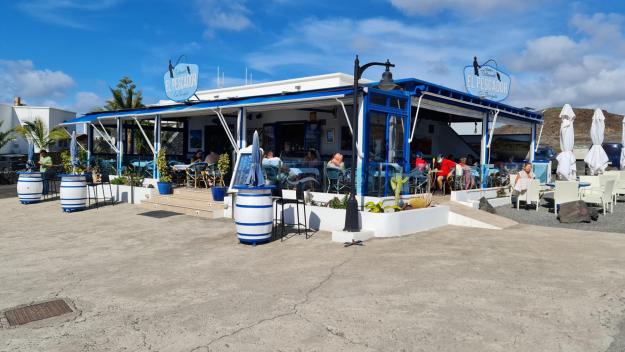
Saturday March 5 2022 – Jane had, in her usual organised fashion, sorted out an approximate plan for the day, which involved gradually working clockwise round the island. Our hotel is at about 2 o’clock, just where the hour hand ends, and the plan was to visit places at about 3 o’clock and every half hour thereafter until 6 o’clock. This was an ambitious plan. Very ambitious, as it turned out. Actually, like many of our Lanzarote plans, unachievable. But we had fun trying.
First port of call, then was El Bufadero, a blow hole on the east coast at La Garita. The sea comes in hard there and the blow hole is a rock formation which fills and empties with sea water as the waves pound it. When we got there, we realised that we wouldn’t safely be able to see the blow hole close to because the wind was so strong and gusty (later checking in with the local weather map, it transpired that gusts were up to 80 km/hour). So we stood well back and I tried for some video, which you can see below. I used a stabilising gimbal, but the wind was so strong that it played havoc with it. One thing that engaged our interest was what looked like little puffs of steam coming up from a particular hole in the rocks – looking like a mini geysir. Anyway, the footage is not brilliant, but you can view it here if you like.
Moving a little towards the centre of the clock face took us to the outskirts of Telde, where there is a handsome basilica, the Basílica de San Juan Bautista. En route, we noticed that there is a distinct tendency to have fun with the roundabouts.


The basilica is quite handsome, if a little sombre in appearance.

and it’s beside a square where parents were bringing small children and clearly Something Was Going To Happen.

We never found out what was going to happen, sadly. The basilica is quite ornate inside, as is typical of Catholic churches.

Jane found on Wikipedia the nugget that the statue of Christ on the main altar, made from corn dough by the Purépecha Mexican Indians, was brought here before 1550. So, erm, there.
The square (and the town generally, actually) has some nice buildings, many of them featuring elaborate balconies.

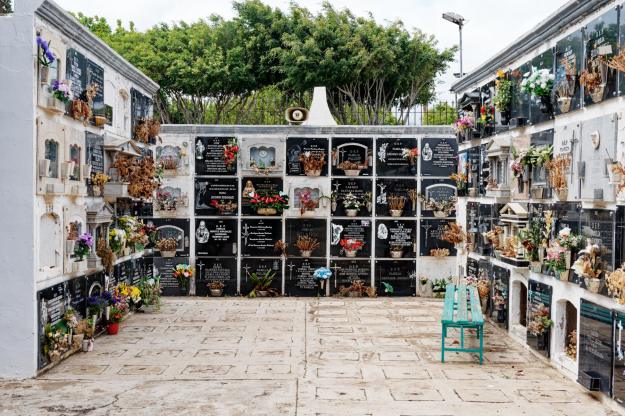
We had a coffee in a mad cafe (whose main and flourishing business seemed to be selling a variety of spanish hams, either as sandwiches or simply as ham by weight) nearby and decided we needed to get on, so headed back to the car via the cemetery (we’re odd that way)

a park laid out in tribute to a local man by his artist wife;


and other remarkable statuary.

We found a lot of artwork just generally lying around in our travels today – see later.
Inching round the clock face towards about half past three (via another roundabout, this one a mobile driven by the wind)

took us to Cuatro Puertas, a neolithic site, which put us in mind of the necropolis at Cala Morell on Menorca, although having none of the grandeur of that remarkable site. Cuatro Puertas means four doors, and this comes from the second thing you see as you stumble up the hillside in the howling bloody gale that was still lashing us every time we got out of the car. The first thing is actually a house, which is magnificently isolated

but still has its own letter box (a hundred metres or so down the track at the point it stopped being surfaced).
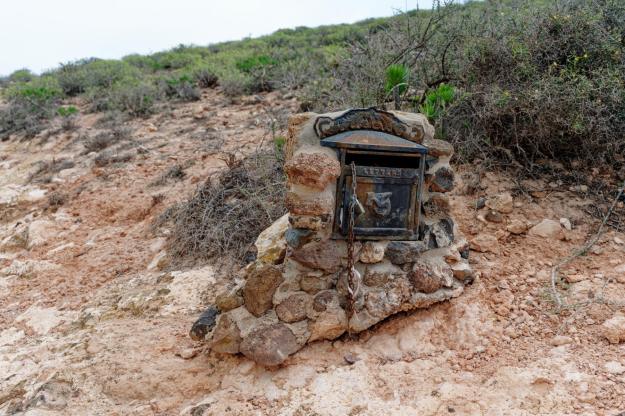
There doesn’t appear to be anyone living there at the moment, and I suspect it takes a particular kind of individual to want to live in such isolation.
Anyway, trying not to be blown off our feet by the wind, we made our way to the first of the site’s sights.


As it says on the tin, four doors. Although the rest of the site is not large, it took us a while to explore it. It was quite impressive (I have lots of photos but will try not to bore you with too many of them); and the wind was a real factor, because the site is basically at the top of a cliff and it felt at times as if there was a real danger of being blown over it. Stumbling up and down uneven rocky surfaces was bad enough – add 50mph gusts and at times it was quite terrifying.
There are some more caves along a path

and the arch on the left hand side would have been the perfect frame for a brilliant photo had there not been a bunch of people having a picnic in THE MIDDLE OF MY SHOT! However, they had every right to be there (I type that with gritted fingers) and we actually found some other great excavated spaces and some markings on one of the walls

which we’re defiantly taking to be neolithic painting rather than modern graffiti.
The site gives some great views over the local countryside, too.


and a local inhabitant was trying to tell us something

but we don’t understand pigeon Spanish, so we ignored him.
Around about 4 o’clock on the clock face of today’s expedition, you’ll find a ravine (barranco in the local tongue) called Guayadeque, which has, at various points along it, restaurants, some of which are actually built into the stone of the ravine. So it seemed a good idea to aim for lunch in one of these, our favourite prospect being Restaurante Vega at the top of the ravine. So we started off, and paused en route to take a couple of photos.
But as we got towards the top, it gradually became clear that every other bugger on the island had exactly the same idea, only about an hour earlier than us. The road around each of the restaurants was crowded, there was nowhere to park and it would seem that all the places were full. So, reluctantly, we decided to turn back (actually, that bit was forced upon us by the dead end at the head of the ravine) and find lunch elsewhere.
Elsewhere turned out to be Agüimes, which is around about half past four on the clock face. Because every other bugger was up the bloody ravine, there was actually a parking space available in the town, and so we headed down towards its centre and treated ourselves to a lunch of local grilled black pig, which was actually pretty good. The restaurant was just by the parish church of San Sebastian. For a parish church, it’s quite substantial

and quite impressive inside.

Its square features statuary at each corner


and the town wouldn’t be complete without a statue of the eponymous San Sebastian, complete with his arrows.

I also took this photo of a building in the town, which I find satisfying for no real reason.

The day was getting on by this stage, so we thought we’d better cut out a couple of intermediate items on the plan and head straight for 6 o’clock on our clock face – the dunes of Maspalomas.
These are, erm, sand dunes at a place called, erm, Maspalomas. The south of the island is a hotspot for the beach-loving kind of tourist; generally the weather in the south of the island seems to be better than in the north, probably because the prevailing wind is from the north and expends much of its venom on the northern half, with the central mountain taking the sting out of it for the southern half. (A similar pattern exists on La Palma, another of the Canary Islands, which has a central mountainous spine – the leeward side of the spine generally has much gentler weather.)
The Maspalomas dunes area is very popular. Again, by another miracle, we were able to park and we made our way down towards the sandy bit, past lots of beach-holiday-type apartment buildings. The initial sight of the dunes is quite impressive

and it’s a pleasant walk to the mirador which is the centre of the attraction. There, one finds lots of people behaving like tourists


and it’s quite popular for people to walk among the dunes.


It was much less windy here, but there was clearly enough wind to shape the sand into characteristic ripples

and I can imagine it might be possible to have quite a zen moment out there.

But you won’t catch me doing it, that’s for sure.
Anyway, we were at 6 o’clock on the clock face and the real time was also 6pm, so it was time to wind our way back (see what I did there?) to the hotel for a Nice Cup Of Tea.
So, we hit quite a few of our planned targets today, but there are still some places to visit in the south and so we’ll focus our energies there tomorrow. Apart from anything else, the weather in the south of the island is forecast to be much nicer than in the north, so we’ll hope for sun later when we go anticlockwise on our visits. So, check in again tomorrow and see how we got on round the island’s clock face.